Today we are proud to announce the availability of TypeScript 7, a 10x faster native port of TypeScript!
Since its early days, TypeScript has promised to deliver on JavaScript that scales.
By bringing strong type-checking and rich tooling to the world of JavaScript, TypeScript made it possible to build non-trivial high-quality apps across platforms.
Last year, our team unveiled TypeScript’s next step in scaling: making every part of the toolset an order of magnitude faster.
The mission was a native port of TypeScript built in Go that could make the most of modern hardware.
This port was done as faithfully as possible, writing new code while maintaining the structure and logic of the original codebase to keep results consistent and compatible between the two compilers.
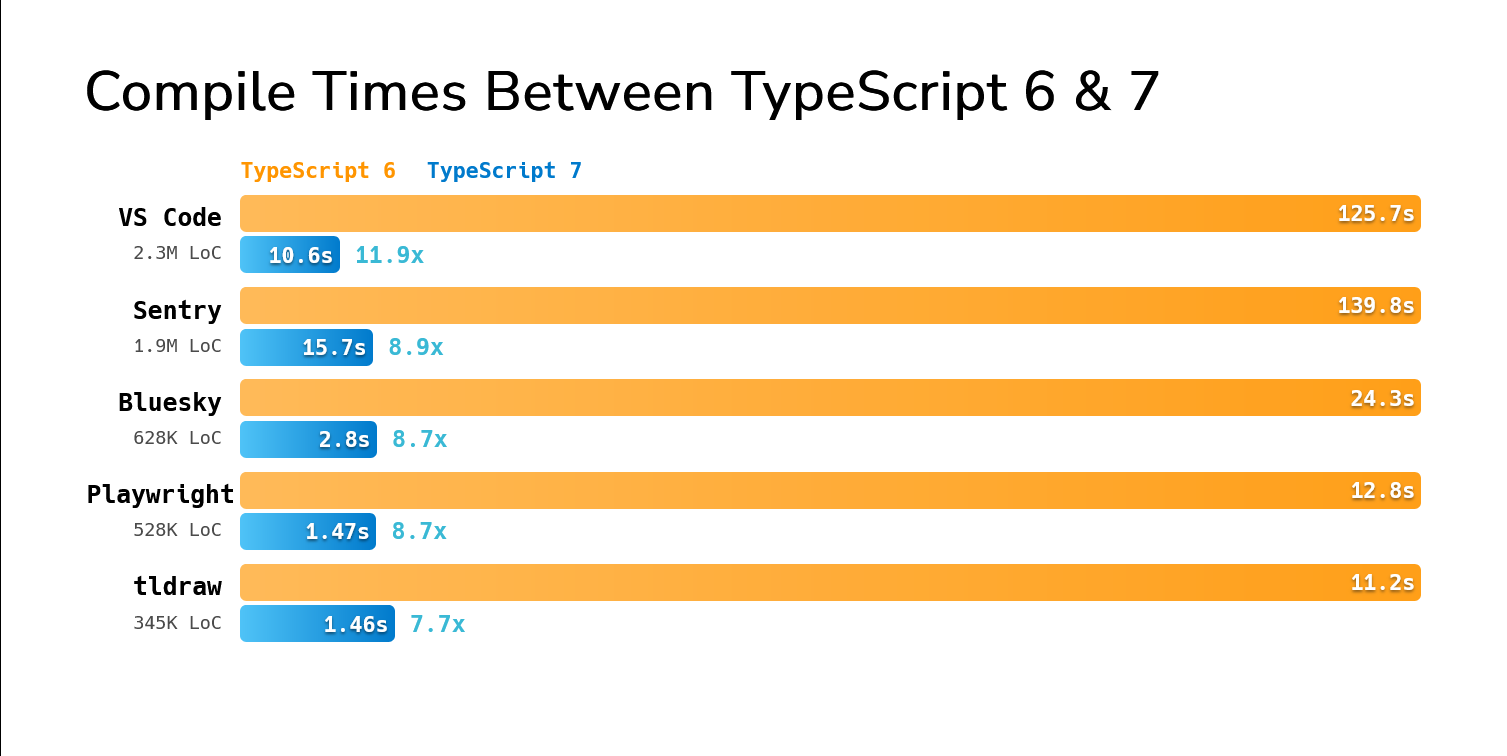
The key difference is that with this new codebase, TypeScript 7 brings native code speed, shared memory multithreading, and a number of new optimizations that typically yield speedups between 8x and 12x on full builds.
our team unveiled TypeScript’s next step
Just as with any other release, TypeScript 7 is available via npm:
That will get you the new tsc executable in your workspace (which you can run via npx tsc).
Of course, a big part of the TypeScript experience is also about editor support.
Your favorite code editor should easily support TypeScript 7 with its new support for the language server protocol (LSP), and its new speed and multithreading improvements.
Whether you’re using something like VS Code, Visual Studio, WebStorm, or any other modern editor, TypeScript 7 should work great.
Just check your editor’s documentation – for example, VS Code has a dedicated extension for TypeScript 7 that you can use today, and Visual Studio will automatically enable TypeScript 7 based on your workspace.
VS Code has a dedicated extension for TypeScript 7 that you can use today
What Does A Faster TypeScript Mean?
A faster TypeScript sounds great on paper, but what does it mean in practice?
Maybe it helps to think about where TypeScript comes up at every stage of development.
A typical day of development might involve opening your editor, opening a TypeScript file, and running an operation like find-all-references across your projects.
Then as you’d start to make edits, maybe you’d expect auto-completions to pop up, and get red squiggles on the fly as you’d make edits.
When you (and more recently, perhaps an AI agent) were ready to build your project, you’d run tsc, check the output for errors, and then run your generated code somehow.
A faster TypeScript means every part above is streamlined.
Waiting for your editor to fully load your project will feel instantaneous.
Delays on find-all-references, auto-completion, and diagnostics should take a fraction of the time they used to.
And when you run tsc, maybe in --watch mode, you’ll be able to tighten your feedback loop and iterate faster than ever before.
You can see this on real-world projects.
In fact, you can try comparing on a few open-source projects yourself.
Here are the build times of running TypeScript 6 and 7 on some fairly large open source codebases.
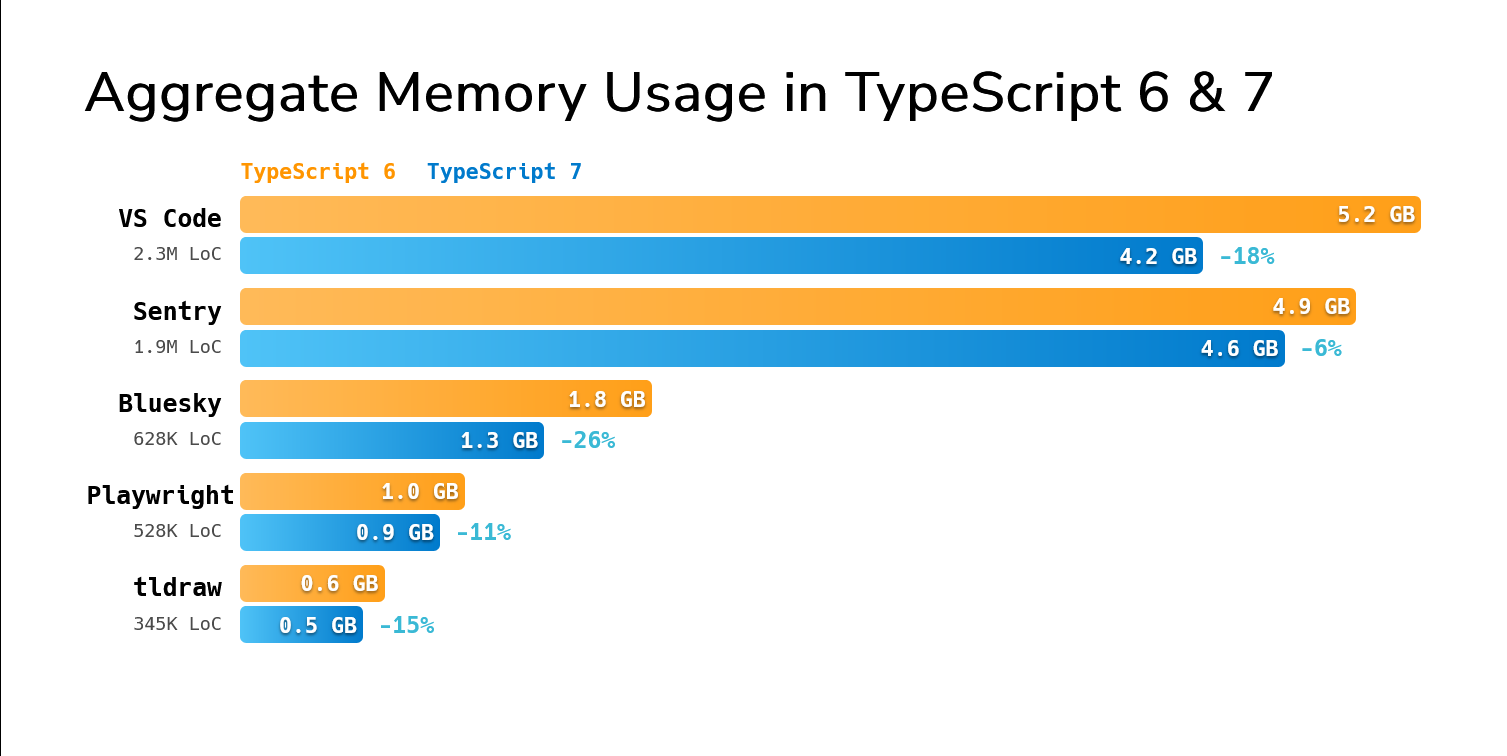
TypeScript 7 also typically does better while asking for less aggregate memory over the span of a build.
Of course, there’s more to the experience than the full build.
On the same computer, opening a file with an error in the VS Code codebase would previously take about 17.5 seconds from the time you opened the editor to the time you saw the first error.
With TypeScript 7, it’s under 1.3 seconds – over 13x faster.
Battle-Tested and Ready for Production
The TypeScript project contains tens of thousands of tests built over more than a decade that run on every commit on our main branch.
They’ve ensured every one of our releases is stable and reliable.
But TypeScript 7 is no ordinary release.
Beyond our test suite, we’ve leveraged a number of different resources to make sure TypeScript 7 is solid for production use.
Over the last year we’ve worked with many large teams internally and externally to test TypeScript 7 on real-world codebases.
The results have been overwhelmingly positive, with entire companies reporting that TypeScript 7 has been stable, fast, and easy to adopt.
For example, the VS Code team recently highlighted their experience with TypeScript 7’s preview releases to move faster in their development cycle.
We’ve also worked with Microsoft teams like Loop, Office, PowerBI, Teams, and Xbox to ensure that TypeScript is ready for the largest of codebases.
Likewise, companies like Bloomberg, Canva, Figma, Google, Lattice, Linear, Miro, Notion, Sentry, Slack, Vanta, Vercel, VoidZero, and more have worked with us to test TypeScript 7 on their codebases and given us feedback to make it better.
VS Code team recently highlighted their experience with TypeScript 7’s preview releases
Additionally, we’ve rebuilt much of our broader test infrastructure to run on TypeScript 7.
TypeScript 6 and earlier had automated and on-demand testing for TypeScript and JavaScript projects on GitHub to detect regressions in the compiler and language service.
The same testing is back, and running against TypeScript 7, finding issues in real codebases so we can find gaps in our core test suite and ship a better experience.
The combination of explicit feedback, automated crash reports, and aggressive testing has made a measurable difference in quality.
In fact, our data insights have shown us that TypeScript 7.0’s new language server has actually reduced failing language server commands by over 80%, and reduced server crashes by over 60% compared to that of TypeScript 6.0.
We’ve also heard some incredible feedback from teams at scale:
Slack engineers have told us that TypeScript 7 eliminated 40% of their merge queue time and brought type-checking time in CI from about 7.5 minutes to 1.25 minutes. Local development in the editor was previously almost “unusable” due to language server load times and engineers would typically let CI do a full type-check. TypeScript 7 has been able to load the same codebase in a few seconds and made local type-checking feasible again.
brought type-checking time in CI from about 7.5 minutes to 1.25 minutes
Builds at Vanta have dramatically improved, showing a speedup of up to 9x faster on one of their biggest projects.
showing a speedup of up to 9x faster on one of their biggest projects
Similarly, the News Services team at Microsoft told us that adopting TypeScript 7 saved them 400 hours a month waiting for CI builds.
Last year, engineers working on PowerBI described TypeScript 7 in the editor as “life-saving” for working on their codebase. They adopted the experience as a default even before TypeScript 7 supported rename functionality in VS Code.
Developers working on Loop’s monorepo were also ecstatic. The previous editor experience was described as unusable at their scale, whereas the TypeScript 7 experience has been “amazing” to use.
Canva developers have told us that TypeScript 7’s language service shows dramatic speedups, going from about 58 seconds to seeing the first error in their editors to about 4.8 seconds.
Running Side-by-Side with TypeScript 6.0
While TypeScript 7.0 is here, it does not ship with an API.
We expect TypeScript 7.1 to ship with a new (and different) API, but until then we have made it a priority to ensure TypeScript can be run side-by-side with TypeScript 6.0 for utilities that still need some programmatic access to the compiler (such as typescript-eslint).
As part of the 6.0/7.0 transition process, we’ve published a new compatibility package, @typescript/typescript6.
This package provides an executable named tsc6, so that if needed, you can install TypeScript 7.0 (which ships its own tsc binary) side-by-side without naming conflicts.
The new package also re-exports the TypeScript 6.0 API, so that you can use tsc for TypeScript 7, while other tooling can continue to rely on 6.0.
Because some tools like typescript-eslint expect to import from typescript directly via peer dependencies, we recommend achieving this via npm aliases.
You should be able to run the following command
or modify your package.json as follows:
Note that doing this will leave you only with a tsc6 executable.
To get 7.0’s tsc, you can add another alias for TypeScript 7 and npx tsc will just work with 7.0:
Nightly Builds and @typescript/native-preview
Until now, most developers have installed TypeScript 7 via the @typescript/native-preview package.
This package shipped nightly builds of the new codebase, and has served the community well with over 8.5 million weekly downloads!
However, going forward, nightly builds will soon resume under the standard typescript package with the next tag.
You can install it with:
Custom Scaling: Parallelization and Controls
TypeScript 7.0 now performs many steps in parallel, including parsing, type-checking, and emitting.
Some of these steps, like parsing and emitting can mostly be done independently across files.
As such, parallelization automatically scales well with larger codebases with relatively little overhead.
But not every step in a TypeScript build is easily parallelizable.
TypeScript 7 introduces the experimental --checkers and --builders flags to fine-tune the parallelization behavior for less-trivial steps like type-checking and project reference building.
It also introduces a --singleThreaded flag to disable parallelization entirely, which can be useful for debugging or running in environments with limited resources.
Type-Checker Parallelization
Other steps, like type-checking, have more complex dependencies across files.
Most files end up relying on the same type information from their dependencies and the global scope, and so running type-checkers completely independently would be wasteful – both in computation and memory.
On the other hand, type-checking occasionally relies on the relative ordering of information in a program, and so type-checking from scratch must always check the same files in an identical order to ensure the same results.
To enable parallelization while avoiding these pitfalls, TypeScript 7.0 creates a fixed number of type-checker workers with their own view of the world.
These type-checking workers may end up duplicating some common work, but given the same input files, they will always divide them identically and produce the same results.
The default number of type-checking workers is 4, but it can be configured with the new --checkers flag.
You may find that increasing this number can further speed up builds on larger codebases where typical machines have more CPU cores, but will typically come at the cost of increased memory usage.
For example, in the table above, we ran TypeScript 7 with its default of --checkers 4.
Here’s what the results look like on the same machine with --checkers 8.
As you can see, these codebases get a better speedup from dedicating more cores, but results will differ across projects and underlying machines.
On the other hand, on machines with fewer CPU cores and less memory (e.g. CI runners) you may want to decrease this number to avoid unnecessary or incidental overhead.
You can specify a value as low as --checkers 1, effectively making type-checking single-threaded and eliminating duplicate work.
In rare cases, varying the number of --checkers may surface order-dependent results.
Specifying a fixed number of checkers across build environments can help ensure everyone is getting the same results, but is up to the discretion of your team.
Project Reference Builder Parallelization
TypeScript 7.0 can parallelize builds within a project, but it can now also build multiple projects at once as well.
This behavior can be configured with the new --builders flag, which controls the number of parallel project reference builders that can run at once when running under --build.
This can be particularly helpful for monorepos with many projects.
Like --checkers, increasing the number of builders can speed up builds, but may come at the cost of increased memory usage.
It also has a multiplicative effect with --checkers, so it’s important to find the right balance for your machine and codebase.
For example, building with --checkers 4 --builders 4 allows up to 16 type-checkers to run at once, which may be excessive.
Unlike --checkers, varying the number of builders should not produce different results;
however, building project references is fundamentally bottlenecked by the dependency graph of projects (with the exception of type-checking on codebases that leverage --isolatedDeclarations and separate syntactic declaration file emit).
Single-Threaded Mode
In some cases, it can be helpful to enforce single-threaded operation throughout the compiler.
This may be useful for debugging, comparing performance with TypeScript 6 and 7, when orchestrating parallel builds externally, or for running in environments with very limited resources.
To enable single-threaded mode, you can use the new --singleThreaded flag.
This will not only cap the number of type-checking workers to 1, but also ensure parsing and emitting are done in a single thread.
Improved --watch Mode
TypeScript 7 ships with a completely rebuilt --watch mode.
--watch is now powered by a new foundation based on the Parcel bundler’s file-watcher that provides efficient and stable cross-platform file watching capabilities.
the Parcel bundler’s file-watcher
When our team set out to port our file watching logic, we encountered a few challenges with cross-platform file watching in Go.
The standard library doesn’t provide a built-in file watching API, and existing third-party libraries we explored had various issues with stability, performance, cross-platform support, or issues with build tooling integration.
We were able to build solutions around polling periodically to check for file changes, and this worked broadly across operating systems;
however it was computationally expensive, especially at larger-scale projects with many dependencies in node_modules.
Even with dynamic scheduling strategies, we found that pure-polling solutions were too taxing for general use.
For many years, Visual Studio Code has relied on @parcel/watcher, and in recent years TypeScript in VS Code has relied on its file watching capabilities indirectly.
While it seemed promising, one of the problems for us with Parcel’s watcher is that it’s written in C++, and in turn requires a full C++ toolchain to build.
Given our positive experience with Parcel’s watcher in VS Code, we explored porting it to Go with a few minimal assembly shims to avoid introducing a new toolchain dependency.
The exploration has been a success – what started as a very direct translation from C++ to Go was further refined into idiomatic Go that still passes the ported test suite.
The watcher is a self-contained package that has allowed us to keep a clean separation of concerns between what we care to watch and why.
We are now seeing significant resource improvements in --watch mode across platforms, and have been hearing positive feedback from earlier users of TypeScript 7.
We’d like to extend our thanks to Devon Govett whose work on Parcel has provided immense benefits to both the Visual Studio Code and TypeScript projects.
We hope this port will provide opportunities and insights for the original Parcel watcher codebase over time.
Updates Since 5.x, and New Behaviors from 6.0
TypeScript 7.0 is made to be compatible with TypeScript 6.0’s type-checking and command-line behavior.
Practically any TypeScript code that compiles cleanly with TypeScript 6.0 (with the stableTypeOrdering flag on, and without any ignoreDeprecations flag set) should compile identically in TypeScript 7.0.
With that said, TypeScript 7.0 adopts 6.0’s new defaults, and provides hard errors in the face of any flags and constructs deprecated in TypeScript 6.0.
This is notable as 6.0 is still relatively new, and many projects will need to adapt to its new behaviors.
We encourage developers to adopt TypeScript 6.0 to make the transition to TypeScript 7.0 easier, and you can also read the TypeScript 6.0 release blog post for more details on these deprecations.
the TypeScript 6.0 release blog post
At a glance, the notable default changes to configuration are:
strict is true by default.
module defaults to esnext.
target defaults to the current stable ECMAScript version immediately preceding esnext.
noUncheckedSideEffectImports is true by default.
libReplacement is false by default.
stableTypeOrdering is true by default, and cannot be turned off.
rootDir now defaults to ./, and inner source directories must be explicitly set.
types now defaults to [], and the old behavior can be restored by setting it to ["*"].
We believe the rootDir and types changes may be the most “surprising” changes, but they can be mitigated easily.
Projects where the tsconfig.json sits outside of a directory like src will simply need to include rootDir to preserve the same directory structure.
For the types change, projects that depend on specific global declarations will need to list them explicitly. For example,
The deprecations that have turned into hard errors with no-op behavior are:
target: es5 is no longer supported.
downlevelIteration is no longer supported.
moduleResolution: node/node10 are no longer supported, with nodenext and bundler being recommended instead.
module: amd, umd, systemjs, none are no longer supported, with esnext or preserve being recommended in conjunction with bundlers or browser-based module resolution.
baseUrl is no longer supported, and paths can be updated to be relative to the project root instead of baseUrl.
moduleResolution: classic is no longer supported, and bundler or nodenext are the recommended replacements.
esModuleInterop and allowSyntheticDefaultImports cannot be set to false.
alwaysStrict is assumed to be true and can no longer be set to false.
The module keyword cannot be used in namespace declarations.
The asserts keyword cannot be used on imports, and must use the with keyword instead (to align with developments on ECMAScript’s import attribute syntax).
/// <reference no-default-lib /> directives are no longer respected under skipDefaultLibCheck.
Command line builds cannot take file paths when the current directory contains a tsconfig.json file unless passed an explicit --ignoreConfig flag.
Template Literal Types Now Preserve Unicode Code Points
TypeScript 7.0 now treats Unicode code points more naturally when inferring from template literal types.
For example:
Previously, TypeScript followed JavaScript’s UTF-16 indexing behavior here and split "😀" into two halves of a surrogate pair (\ud83d and \ude00).
That was technically consistent with indexing in JavaScript (e.g. the inferred Head type was equal to "😀abc"[0]), but it usually wasn’t what people intended, and could produce string literal types containing unpaired surrogates that aren’t semantically meaningful.
This is a breaking change for type-level string manipulation that intentionally modeled UTF-16 code units, such as some string Length utilities.
In practice, we expect the new behavior to be more useful and less surprising: template literal inference now follows the same intuition as iterating a string with for...of or spreading it with [...str], where "😀" is treated as one unit.
JavaScript Differences
As we ported the existing codebase, we also took the opportunity to revisit how our JavaScript support works.
TypeScript originally supported JavaScript files by using JSDoc comments and recognizing certain code patterns for analysis and type inference.
Lots of the time, this was based on popular coding patterns, but occasionally it was based on whatever people might be writing that Closure and the JSDoc doc generating tool might understand.
While this approach was helpful for developers with loosely-written JSDoc codebases, it required a number of compromises and special cases to work well, and diverged in a number of ways from TypeScript’s analysis in .ts files.
In TypeScript 7.0, we have reworked our JavaScript support to be more consistent with how we analyze TypeScript files.
Some of the differences include:
Values cannot be used where types are expected – instead, write typeof someValue
@enum is not specially recognized anymore – create a @typedef on (typeof YourEnumDeclaration)[keyof typeof YourEnumDeclaration].
A standalone ? is no longer usable as a type – use any instead.
@class does not make a function a constructor – use a class declaration instead.
Postfix ! is not supported – just use T.
Type names must be defined within a @typedef tag (i.e. /* @typedef {T} TypeAliasName /), not adjacent to an identifier (i.e. /* @typedef {T} / TypeAliasName;).
Closure-style function syntax (e.g. function(string): void) is no longer supported – use TypeScript shorthands instead (e.g. (s: string) => void).
Additionally, some JavaScript patterns, like aliasing this and reassigning the entirety of a function’s prototype are no longer specially treated.
While some of our JS support is in flux, we have been updating this CHANGES.md file to capture the differences between TypeScript 6.0 and 7.0 in more detail.
Editor Experience
As we mentioned above, TypeScript 7.0’s performance improvements are not limited to the command line experience – they also extend to the editor experience too.
For VS Code users, we have a dedicated extension for TypeScript 7.
When you install this extension, it will automatically become the default experience.
You can disable and re-enable it at any time with the “Disable TypeScript 7 Language Server” and “Enable TypeScript 7 Language Server” commands from the command palette.
In the coming weeks support for TypeScript 7 will ship as part of VS Code itself.
a dedicated extension for TypeScript 7
For Visual Studio users, the latest version of the IDE will automatically enable TypeScript 7 based on your workspace. You won’t need to do anything differently.
Of course, TypeScript 7 should work great in any editor of your choosing.
The new foundation is built on the Language Server Protocol (LSP) and is able to leverage multiple threads to serve simultaneous requests as quickly as possible.
Since it first debuted, we’ve added in missing functionality like auto-imports, expandable hovers, inlay hints, code lenses, go-to-source-definition, JSX linked editing and tag completions, and more.
Missing features from TypeScript 7.0 beta, such as semantic highlighting, “sort imports”, “remove unused imports”, and more are now in.
Additionally, we’ve continued to drive performance and stability in the past few months.
We’ve rebuilt much of our testing and diagnostics infrastructure to make sure the quality bar is high, in which we are able to fuzz-test the language server against the top TypeScript and JavaScript codebases on GitHub.
As we’ve mentioned above, TypeScript 7’s new language server is significantly more stable than TypeScript 6’s.
TypeScript and Embedded Languages
It’s worth calling out that workflows that use Vue, MDX, Astro, Svelte, and others will likely not yet be able to leverage TypeScript 7.
Similarly, specialized type-checking within templates like Angular will also likely not use TypeScript 7.
This is mainly because TypeScript 7 does not yet expose a stable programmatic API, and so tools (such as Volar) which embed TypeScript into their own compilers and language services can only currently rely on TypeScript 6.0.
We expect this to be a point-in-time issue, as we are committed to providing a solution here.
We will be actively working with the maintainers of these projects to ensure TypeScript 7 supports these workflows.
Until then, we recommend that teams use TypeScript 7 in scenarios where language server plugins are not required.
Projects using Angular can use a combination of TypeScript 7 to get fast project-wide error detection at the CLI with tsc, and TypeScript 6.0 for editor support.
Projects using Vue, MDX, Astro, Svelte, and others will need to continue using TypeScript 6.0 for now.
In VS Code, users can simply run the “Disable TypeScript 7 Language Server” command to revert to TypeScript 6.0.
The Road Forward
TypeScript 7.0 is a major milestone in the TypeScript project.
This port has been the primary focus of our team for over a year, and with 7.0 out, we will be returning to new feature work, ergonomic improvements, more performance wins, and implementing a new API for the broader ecosystem.
While that seems major, we expect a fairly similar timeline to releases prior to TypeScript 7.0, with new featureful versions published every 3-4 months.
With TypeScript 7.1 on the horizon, we hope to bridge any gaps to help bring the community forward.
We also encourage you to share your experience using TypeScript 7.0 online.
Feel free to follow and tag @typescriptlang.org on Bluesky or @typescript@fosstodon.org on Mastodon, or @typescript on Twitter, and let us and others know what you think of TypeScript 7.
@typescriptlang.org on Bluesky
@typescript@fosstodon.org on Mastodon
We know this new release will be incredibly valuable for the TypeScript ecosystem.
We hope that it makes your day-to-day coding experience more fast, fun, productive, and joyful.
Welcome to the native era of the TypeScript toolset.
Happy Hacking!
– The TypeScript Team